My Software
Use the “My Software” section to access licenses assigned to you, along with release notes, current downloads, and available free viewers.
Forgot to log out of your software?
Use the “Remote Logout” button on the “My Software” page. This button is shown only for licenses that use login-based authentication.
Use the “Remote Logout” button on the “My Software” page. This button is shown only for licenses that use login-based authentication.
Select “More Details” to view additional information for a license. See below for more information on this section.
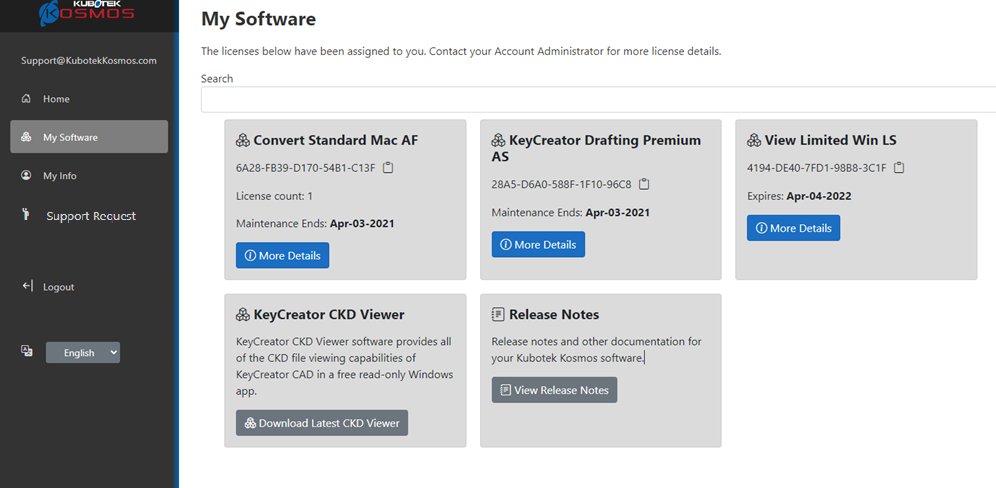
More Details
On the ‘License Info’ dialog box, you can view the following:
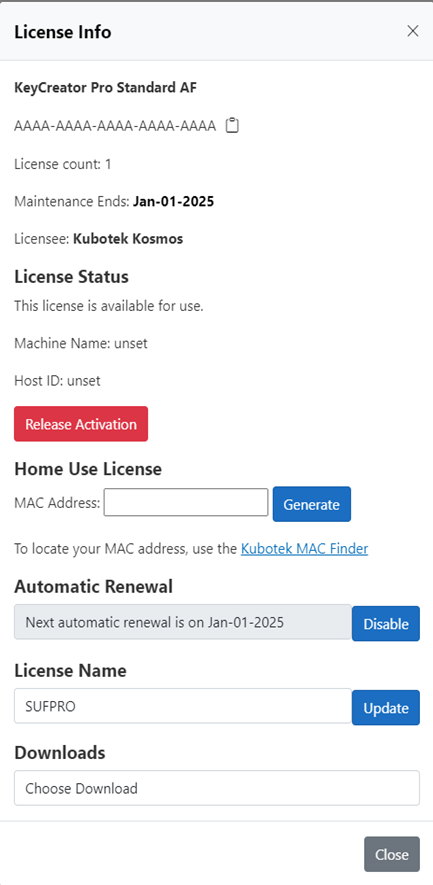
License Info
View the product name, expiration date, and activation code for the license.
License Status
View real-time activation and usage information for the license.
Automatic Renewals
View the automatic-renewal status of the license. See “Automatic Renewals” in “Account Settings” for more information.
License Name
Assign a friendly name to help identify the license.
Downloads
Access current software downloads.
Renew Online
Redirects to the webstore where you can maintain your licenses.
View the product name, expiration date, and activation code for the license.
License Status
View real-time activation and usage information for the license.
Automatic Renewals
View the automatic-renewal status of the license. See “Automatic Renewals” in “Account Settings” for more information.
License Name
Assign a friendly name to help identify the license.
Downloads
Access current software downloads.
Renew Online
Redirects to the webstore where you can maintain your licenses.