Context Menu Format Solid
This Format Solid dialog combines both the Set Entity Rendering options and Set Material Rendering Properties when selecting solids to edit. Once all options are configured choose OK to update the render conditions for the picked solid.
Format Solid Rendering Dialog
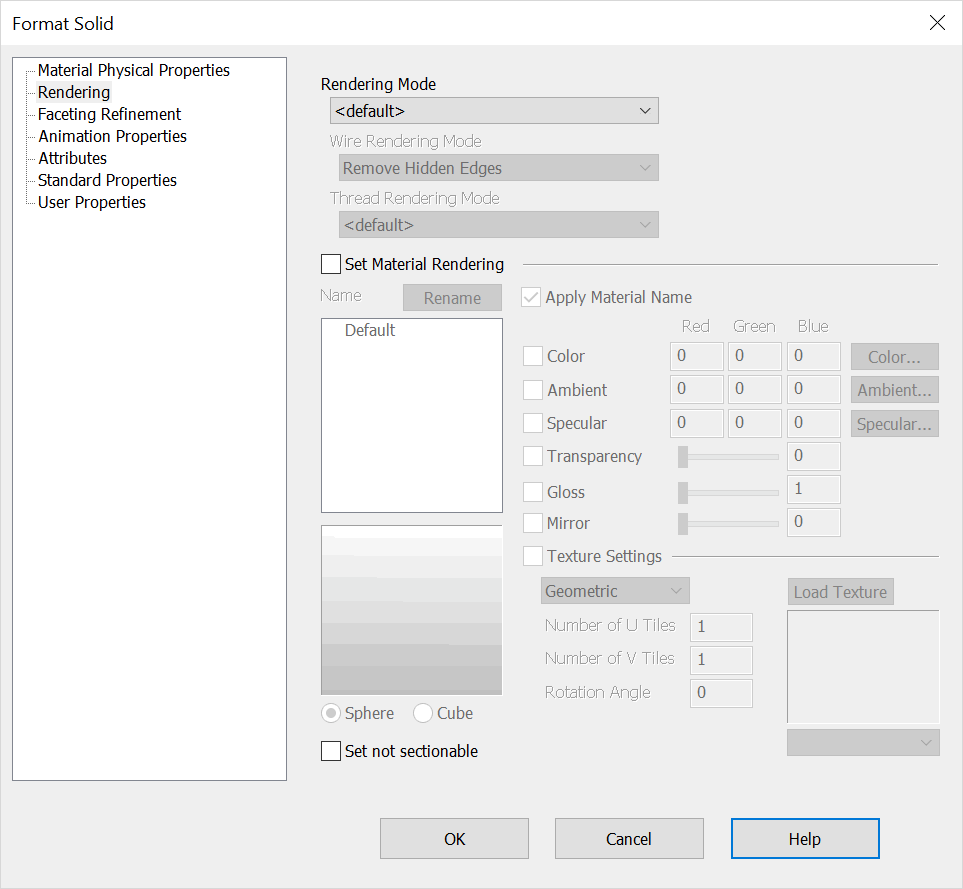
Rendering Mode
This drop down menu shows the basic rendering modes available for solid bodies. Choosing default will give the solid the same render attributes found in View>Render>Shade.
Wire Rendering Mode
When the shaded options are chosen in Rendering Mode the Wire Rendering Mode drop down items are selectable. Choose from among the following options to display the solid edges:
Remove Hidden Edges, All Edges Show, No Edges Show or Dash Hidden Edges
Thread Rendering Mode
Set the detail of threads: None, Simple Schematic, Detail or Detail No Lines.
Set Material Rendering
Checking on Set Material Rendering will activate the material rendering options available for the chosen solid. See the Set Material Rendering Properties for an overview of each option and overall use.
Set not sectionable
Checked on this mode will exclude the edit object from being sectioned in a Layout\ Section View operation. This setting is also available in Edit\ Entities\ Set Not Sectionable and in the setup of any Tools\ Feature, Fastener and Mechanical Element.