License Activation
Phase 1
Get the Activation Code
-
Log into the Kubotek Kosmos Support Site. Select the My Software option in the menu along the left near the top. This will display all of the Kubotek products assigned to you. If your product is not on the list, have your account admin assign the product to you from the Account Admin Licenses option.
-
Select the More Details button to the right of your product to reach the license details and product downloads page. A note under the Activation Code will make clear if the license is available or has already been checked-out to a workstation. If it is available, copy the 20-digit code to the Windows clipboard.
Phase 2
Start KeyCreator
-
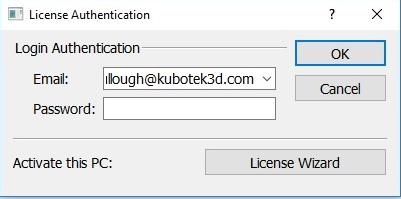
Use your preferred method in Windows to start your installed KeyCreator program. When you try to start a KeyCreator program on a workstation without a license activation, the License Authentication dialog appears.
-
Select the License Wizard option in the lower right. This will start the Kubotek Licensing Wizard program.
-
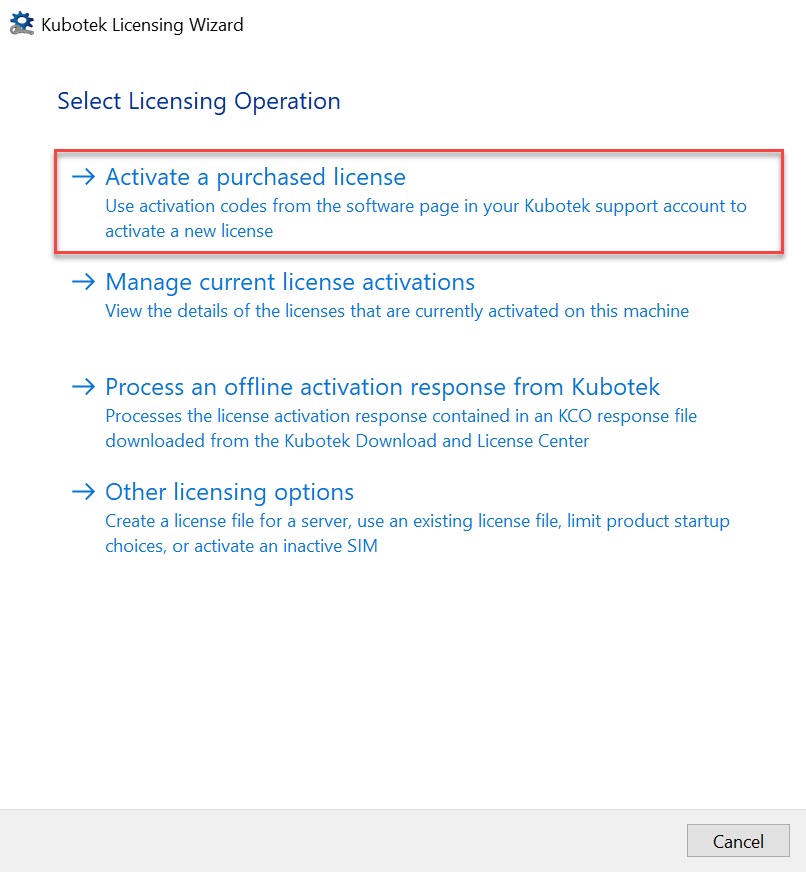
Click on Activate a purchased license
-
Paste your 20-digit Activation Code into the available field — (i,e 1111-1111-1111-1111-1111). The default option "Connect to the Kubotek activation server directly over the internet" should remain selected.
-
Click Activate at the bottom of the Kubotek Licensing Wizard dialog.
Note: If your workstation is not connected to the internet, there is a separate method for activation. That is covered in the help topic Offline Activation.