Windows Metafile Export Options Dialog
The Vector Output Setup dialog appears after you have selected the entities to be exported.
Dialog Options:
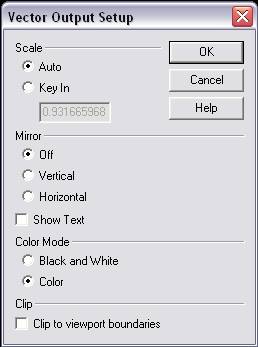
Scale
Specify a scale value.
-
Auto – When selected, entities will be autoscaled.
-
Key In – Allows you to manually enter a scale value at which the entities will be exported. For example, entering .50 would scale entities to ½ the size of the source geometry.
Mirror
Specify a mirror type from the available options. Note that the mirror feature can also be turned off.
-
Off – When selected, the mirror feature will be disabled.
-
Vertical – When selected, the entities will be mirrored vertically.
-
Horizontal – When selected, the entities in the file will be mirrored horizontally.
-
Show Text – When enabled, any text contained in the part file will be exported as well. When this setting is unchecked, no copies containing text will be copied.
Show Text
When enabled, any text contained in the part file will be exported as well. Unchecked, the text will not be included in the resulting .WMF file.
Color Mode
Specify a color mode for the exported entities.
-
Black and White – When selected, all entities will be copied with a black color attribute.
-
Color – When selected, copied entities will retain their original color attributes.
Clip
This feature allows you to trim an image to the boundaries of the viewport. When this setting is enabled, all selected entities are trimmed to the viewport boundaries. When the checkbox is disabled, all selected entities are outputted regardless of whether or not the entities extend past viewport boundaries.