Solid Edge Import

This function supports part file, assembly file and sheet metal file import, (.par , .asm and .psm). For Solid Edge versions supported see Translator Specifications.
Dialog Options
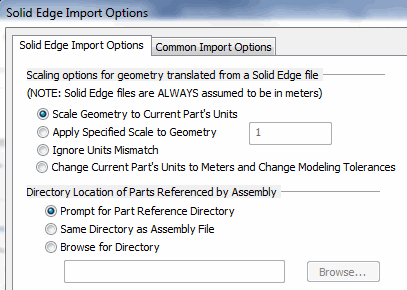
Scaling Options
-
Scale Geometry to Current Part’s Units – When selected, the geometry in the file to be imported will be scaled to the units of measurement in the current part.
-
Apply Specified Scale To Geometry – When selected, you will be able to specify a scale value in the editable field. This scale is then applied to the imported geometry.
-
Ignore Units Mismatch – When selected, a mismatch of units between the import file and the current part will be ignored.
-
Change Current Part’s Units to Meters and Change Modeling Tolerances – When selected, the units of the current part will be changed to meters, and the modeling tolerances will update accordingly.
Directory Location of parts referenced by assembly:
Choose which method best fits the import of referenced files into the import process.
NOTE: Once objects are placed a DynaHandle appears for further edits of placement as well as conversation bar options (Copy for example). Once edits are complete choose OK to accept.