Light Direction

The Light Direction function allows you to control the direction of light shining on a shaded model to give the effect you desire. The function lets you change the light direction either by entering values in the X, Y or Z fields on the Camera Light dialog, or by moving the "modifier" with the mouse. Then click Accept on the Conversation bar to apply. (Moving along the x-axis always moves in the horizontal direction, moving along the y-axis always moves in the vertical direction, and moving along the z-axis always moves in the depth-direction.)
Using the Function:
-
Click View>Render>Light Direction. The Camera Light dialog appears and the modifier appears in the viewport, both of which are illustrated below. Buttons appear on the Conversation bar, including the Accept button.
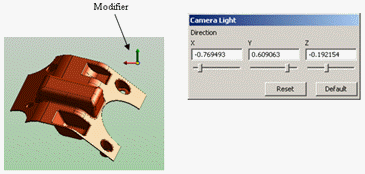
-
To produce the desired light on the model, enter values in the X, Y or Z field on the Camera Light dialog (or use the slide bar), or move the modifier in the viewport with the mouse.
-
Click OK.