Geodesic Curve Dialog Options
When Geodesic Curve is selected from the Create>Advanced Splines submenu, the following dialog appears.
Dialog Options:
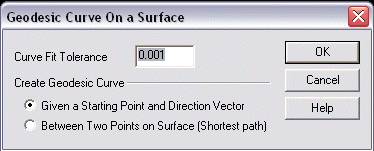
Curve Fit Tolerance
Specify a value for the curve fit tolerance.
Create Geodesic Curve
Specify whether to create the geodesic curve by a starting point and direction vector, or between two points on the surface (shortest path).
-
Given a Starting Point and Direction Vector - The geodesic curve is traced out from its initial starting position and direction and terminates when it hits a surface boundary.
-
Between Two Points on the Surface - A geodesic curve is generated using an iterative technique to find the shortest path between the two points along the surface.