Silhouette Curve Dialog Options
Once you have selected the faces, the Silhouette Curve dialog appears, through which you are able to specify Silhouette Direction, among other settings.
Dialog Options:
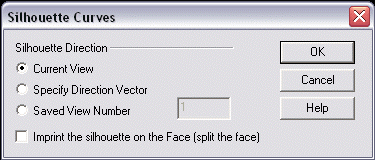
Silhouette Direction
-
Current View – When selected, the silhouette direction will be in the current display view.
-
Specify Direction Vector – When selected, you will be prompted to specify a direction vector.
-
Saved View Number – When selected, you are able to specify a saved view number.
Imprint Silhouette Curve on the Face
The silhouette curves may optionally be imprinted into their owning faces, thus splitting the face along the curve creating a new face.