Create Torus Dialog Options
The following settings are contained within the Create Torus dialog.
Dialog Options:
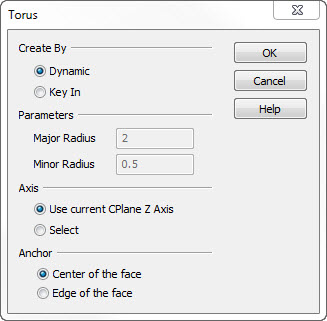
Create By
Chose a method by which the torus is to be created.
-
Dynamic - See Creating a Primitive Torus for details on using the DynaHandle to create the primitive.
-
Key In - Input the dimensions of the minor and major radii on the menu.
Parameters
Indicate the parameter by which the radius is defined. Note that both parameter options will be grayed out when Create By>Sketch is selected.
-
Major Radius - Indicate the major radius value.
-
Minor Radius - Indicate a value for the minor radius.
Axis
The options in the Axis section determine how the axis for the height dimension of the torus is defined.
-
Use Cplane Z Axis - The height dimension will be measured along the current construction plane z-axis.
-
Select - Using select will require that you define the axis by one of the following options: 2 Points, Line, Vector, Tangent, Prp2Pln, and Key In.