Save Snapshots

Use this feature to save snapshots through the dialog that appears when the function is selected. Snapshots will be saved to the *.PMF format.
Using the Function:
-
Select Save Snapshot from the View>Orientation>Snapshot Ribbon area.
-
The Snapshot Manager Insert Data dialog appears. Configure the dialog options and click OK.
Dialog Options:
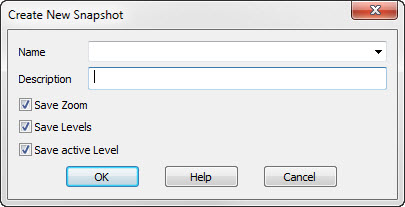
Name
Specify a name for the snapshot.
Description
Specify a description for the snapshot.
Save Zoom
When selected, the current zoom parameter will be saved.
Note: The saved zoom/view will show as a current listed Display View or instance view (with a [PM] appended to name) if Save Zoom is checked on, as well as appearing in the Load Snapshot function. Unchecked will result in no display view saved.
Save Levels ON
When selected, levels will be saved turned on.
Save Active Level
When selected, the active level will be saved with the snapshot.