2ND Follow Surf Rough with Up/Down Z Dialog
This dialog appears when you click the OK button in the Follow Surf Rough with Up/Down Z dialog.
Dialog Options:
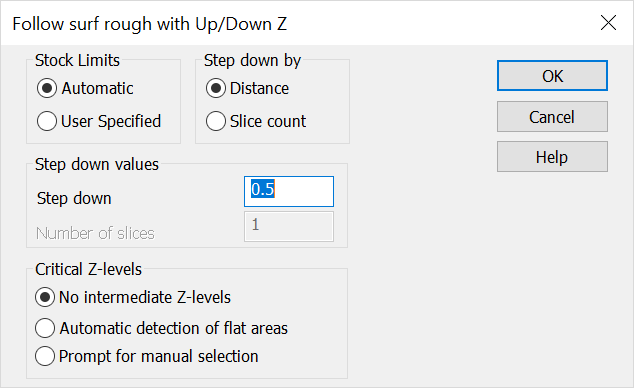
Stock Limits
-
Automatic – Determine heights for machining by verifying that all of the geometry is machined.
-
User Specified – Prompt user to indicate a zone in the Z-Axes to control the machining area.
Step Down By
-
Distance – The step down will be created using a delta value for Z steps.
-
Slice Count – Divide the distance to be machined in Z by the number of slices.
Step Down Values
-
Step Down – Specify the Delta value used to determine Z steps.
-
Number of Slices – This is the number divided into the distance to machine to determine the Z steps.
Critical Z Levels
-
No Intermediate Z-Levels – When selected, the software will not factor flats into the tool path.
-
Automatic Detection of Flat Areas – When selected, the software will look for flat areas and produce Z levels at the part wall stock value above the plane.
-
Prompt for Manual Selection – When selected, you will be prompted for specific Z levels requiring tool paths. The part wall stock value will offset the levels that are selected.