Project to Surface

This function allows you to project point entities either normal to a surface, or along a vector direction onto the surface. Optionally, an offset from the surface may be specified forming a temporary offset surface with which to project onto. Multiple surfaces can be selected.
Using the Function:
-
Select Projected to Surface from the Create>Advanced Points submenu.
-
Select the surface(s) to project onto.
-
Select the point entities. The points are projected.
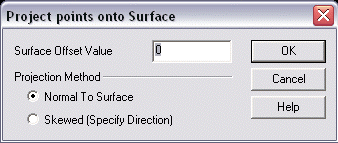
Surface Offset Value
Specify a value for the Surface Offset.
Projection Method
Select either Normal to Surface or Skewed (Specify Direction) for the Projection Method.