Compare List
Create a custom list and open files with Compare List:
Create list with text editor such as MS Notepad and save file as a .lst

 |
File Open Fails: |
|
A common reason for this is that the file type version is not supported, (an updated version for example): File Type and Version Support |
 |
Setting Units |
|
Parasolid and CATIA V5 files are unit less. Validate requires a unit of measure which is set in Customize Application.
|
 |
Hidden Entities: |
|
By default hidden entities are not read when opening a CAD file (useful when unnecessary content is present in file). Use Customize Applications — Read Hidden Entities to show all hidden entities when loading file. |
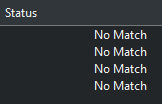
No Match:
Occurs when a file lists with no matched pair, (file name difference for example). Run a Compare Files or correct file name difference.
Choose a single pairing to open File Compare session for that pair:
